STM32 #17: Using the FatFs API for Reading and Writing Files
The last post connected the sd_card.c driver we made to the FatFs Media Access Interface (MAI) at diskio.c. Previously we read, wrote, and traversed the SD card manually by reading raw hex and finding the corresponding metadata. Now we should be able to abstract things like sectors, clusters, FAT tables, boot sectors and SPI away and just think about creating, reading, and writing files.
A recap on where we are in the file system stack:
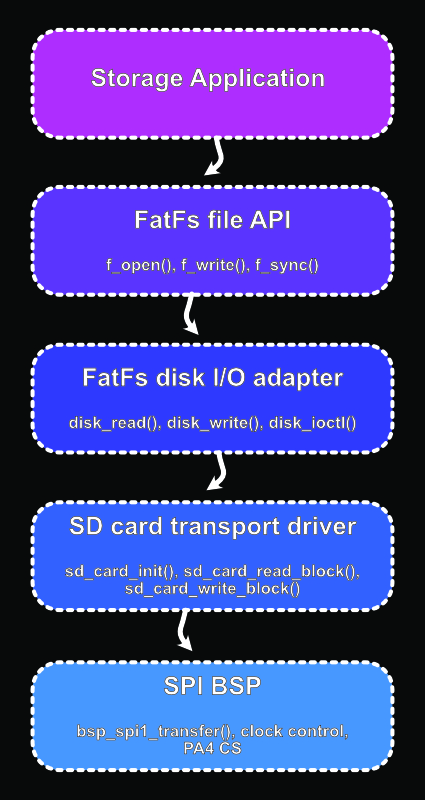
It is worth clarifying that we are testing the FatFs API which uses the Media Access Interface developed previously. Hopefully this makes the boundary a little clearer:
"FatFs API": f_mount(), f_open(), f_read(), f_write(), f_close(), ...

"Media Access Layer (MAI)": disk_initialize(), disk_read(), disk_write(), ...
Here is a link to the ChaN site with the FatFs application note which most of the post series is based on.
This post will give a brief description of the FatFs API and will test three things:
- Mounting the filesystem
- Write a new file and contents to the card
- Read the written file contents and compare the result
I would just put a few FatFss calls in main.c, see that they work and move on, but I wanted to make my testing more usable for later on, because storage bugs are the kind of thing I don’t want to discover later as I keep building my sensor logger. So I have presented testing the code as a self contain hardware integration test.
FatFs API
The FatFs API covers File Access, Directory Access, File and Directory management, Volume management and System configuration. For details see the ChaN site.
Mounting the file system
FatFs needs a work area known as a filesystem object for each logical drive. Prior to any read/write operations, a filesystem object needs to be registered with f_mount. Once f_unmount has unmounted the drive the work area can be discarded with free(fs). You can also reinitialise the filesystem after it has been mounted by calling f_mount again.
f_mount would typically be called once on system startup.
Here is the f_mount and f_unmount API:
FRESULT f_mount (
  FATFS*       fs,    /* [IN] Filesystem object */
  const TCHAR* path,  /* [IN] Logical drive number */
  BYTE         opt    /* [IN] Initialization option */
);
FRESULT f_unmount (
  const TCHAR* path   /* [IN] Logical drive number */
);
fs is a pointer to the filesystem object to be registered or cleared. A null pointer will unregister the filesystem.
path is a pointer to the null-terminated string that specifies the logical drive.
opt is the mounting option:
- 0: Do not mount now(to be mounted on first access of volume)
- 1: Force mount the volume to check if it is ready to work.
If fs is a NULL then this argument has no meaning.
return values: FR_OK, FR_INVALID_DRIVE, FR_DISK_ERR, FR_NOT_READY, FR_NOT_ENABLED, FR_NO_FILESYSTEM
Find out more here.
Test: Mounting the filesystem
For the following tests I’m going to create a sort of hardware integration test in tests/hardware/test_fatfs.c which I will manually call in main.c, this way the tests are separated enough that I can reuse them later with a small embedded test runner. If you are following this then don’t forget to add them to your Makefile!
For the hardware test directory I’ve made a header file called test_fatfs.h which contains the following:
#pragma once

#include <stdbool.h>

bool test_fatfs_mount(void);
bool test_fatfs_write(void);
bool test_fatfs_read(void);
Let’s write a basic test for f_mount() which was covered briefly in the last post, as if this fails everything after it will fail, we are looking for a return value of FR_OK:
#include "test_fatfs.h"

#include "ff.h"
#include "bsp/bsp_uart.h"

#include <string.h>

static FATFS fs; //File system object
/* I am keeping the FATFS object as a file scope static inside test_fatfs.c.
 * That keeps it private to this test module, but gives it program lifetime.
 * FatFs stores a pointer to the filesystem work area after f_mount(), so I
 * do not want that object disappearing when a test function returns.
 */

bool test_fatfs_mount(void) {

        FRESULT fr = f_mount(&fs,       // Filesystem object
                             "0:",      // Filesystem path
                             1);        // Mount option - force mount immediately

        // Test fail
        if (fr != FR_OK) {
                uart_write_string("test_fatfs: [FAIL] f_mount\r\n");
                return false;
        }

        // Test pass
        uart_write_string("test_fatfs: [PASS] f_mount\r\n");
        return true;
}
In main.c we can try out f_mount() - which we know works from the last post! At least it should, if it doesn’t have a go at reformatting the SD card on a different device, and then check your wiring! If it still doesn’t work go back through the posts to check out ways to monitor the SPI lines.
#include "tests/hardware/test_fatfs.h"

int main(void) {
        /*
        * all the board initialisation code here
        */

        test_fatfs_mount();

        while(1) {}; // This allows us to monitor the UART via minicom without other code blitzing it
}
Writing a file
For writing a file we will need to open the file with f_open, write it with f_write, and close it with f_close.
f_open opens a file and creates a file object which becomes the identifier for subsequent read/write operations to the file. If the function succeeds the file object is valid, if not then the file object becomes invalid.
The file object should be closed with the f_close function after the session of the file access is finished.
For the full API see here
The f_open() API:
FRESULT f_open (
  FIL* fp,           /* [OUT] Pointer to the file object structure */
  const TCHAR* path, /* [IN] File name */
  BYTE mode          /* [IN] Mode flags */
);
fp is the pointer to the blank file object structure.
path is a pointer to the null-terminated string that specifies the file name to open and create.
mode are flags that specify the type of access and open method for the file, we will focus on flag FA_READ, FA_WRITE and FA_CREATE_ALWAYS, see the full list in the API docs.
There are a lot of return values, again we are looking for FR_OK in this test.
The f_write() API:
The write function starts to write data to the file at the file offset pointed by the read/write pointer of the file object. The r/w pointer advances with the number of bytes written.
f_write() API:
FRESULT f_write (
  FIL* fp,          /* [IN] Pointer to the file object structure */
  const void* buff, /* [IN] Pointer to the data to be written */
  UINT btw,         /* [IN] Number of bytes to write */
  UINT* bw          /* [OUT] Pointer to the variable to return number of bytes written */
);
fp is a pointer to the open file object structure.
buff is a pointer to the data to be written
btw specifies the number of bytes to write in range of UINT. If the data needs to be written fast it should be written in as large a chunk as possible (more on this in a future post)
bw is a pointer to the variable UINT type that receives the number of bytes that were written.
There are several return values, we are looking for FR_OK.
After the function succeeds, *bw should be checked to detect if the disk is full, in the case of *bw < btw, it means the volume got full during the write operation.
The f_close() API:
The f_close function closes an open file object. If the file has been changed, the cached information of the file is written back to the volume.
The f_close API is below:
FRESULT f_close (
  FIL* fp     /* [IN] Pointer to the file object */
);
fp is the pointer to the open file object to be closed.
We are again looking for a return value of FR_OK.
For the full API see here
Test: Writing a file
Now we have enough to actually write a file! Here is the test function I’ve added to test_fatfs.c file:
bool test_fatfs_write(void) {

        const char MSG[] = "TEST: FatFs Write\r\n";
        const char FPATH[] = "0:/TESTW.TXT";
        FIL file;                                // File object
        FRESULT fr;                              // Return code / status
        UINT bytes_written;                      // Write count
        UINT bytes_to_write = sizeof(MSG) -1u;   // To write count

        // Mount - Only needed if hasn't been mounted earlier but also won't harm anything if has, unless earlier files were not closed with f_close.
        fr = f_mount(&fs,       // Filesystem object address
                     "0:",      // Filesystem path
                     1);        // Option mount now
        if (fr != FR_OK) {
                uart_write_string("test_fatfs: [FAIL] Write - Mount\r\n");
                return false;
        }

        // Open
        fr = f_open(&file,
                    FPATH,                            FA_WRITE | FA_CREATE_ALWAYS); // Mode: write and create new file
        if (fr != FR_OK) {
                uart_write_string("test_fatfs: [FAIL] Write - Open\r\n");
                return false;
        }

        // Write
        fr = f_write(&file,
                     MSG,               // Buffer to write
                     bytes_to_write,    // Number of bytes to write
                     &bytes_written);   // Number of bytes written
        if (fr != FR_OK) {
                f_close(&file);
                uart_write_string("test_fatfs: [FAIL] Write - Write\r\n");
                return false;
        }
        if (bytes_written != bytes_to_write) {
                f_close(&file);
                uart_write_string("test_fatfs: [FAIL] Write - Partial write\r\n");
                return false;
        }

        // Close
        fr = f_close(&file);
        if (fr != FR_OK) {
                uart_write_string("test_fatfs: [FAIL] Write - Close\r\n");
                return false;
        }

        // Test pass
        uart_write_string("test_fatfs: [PASS] Write\r\n");
        return true;
}
Have a go at calling this in main, hopefully it passes!
Reading a file:
The f_read() function starts to read data from the file at the file offset pointed by the read/write pointer of the file object. The read/write pointer advances as number of bytes read. After the function has succeeded, *br should be checked to detect end of the file.
For more details check the API here
The f_read() API:
FRESULT f_read (
  FIL* fp,     /* [IN] File object */
  void* buff,  /* [OUT] Buffer to store read data */
  UINT btr,    /* [IN] Number of bytes to read */
  UINT* br     /* [OUT] Number of bytes read */
);
fp is a pointer to the open file object structure. If a null pointer is given, the function fails with FR_INVALID_OBJECT.
buff is a pointer to the buffer to store the read data.
btr is the number of bytes to read in range of UINT type. If the file needs to be read fast, it should be read in as large a chunk as possible.
br is a pointer to the variable in UINT type that receives number of bytes read. If the return value is equal to btr, the function return code should be FR_OK.
Return values: FR_OK, FR_DISK_ERR, FR_INT_ERR, FR_DENIED, FR_INVALID_OBJECT, FR_TIMEOUT
Test: Reading a file
Now back to test_fatfs.c to create the file read test:
bool test_fatfs_read(void) {
        const char MSG[] = "TEST: FatFs Write\r\n";
        const char FPATH[] = "0:/TESTW.txt";
        FIL file;
        FRESULT fr;
        UINT bytes_read = 0u;
        char buffer[64];

        // Mount
        fr = f_mount(&fs,
                     "0:",
                     1);
        if (fr != FR_OK) {
                uart_write_string("test_fatfs: [FAIL] Read - Mount\r\n");
                return false;
        }

        // Open
        fr = f_open(&file,              // file object
                    "0:/TESTW.TXT",     // file path
                    FA_READ);           // Read only flag
        if (fr != FR_OK){
                uart_write_string("test_fatfs: [FAIL] Read - Open TESTW.TXT\r\n");
                return false;
        }

        // Read
        fr = f_read(&file,              // file object
                    buffer,             // buffer to store read data
                    sizeof(buffer) -1u, // Number of bytes to read, leave 1 byte for null terminator
                    &bytes_read);       // Number of bytes actually read
        if (fr != FR_OK){
                uart_write_string("test_fatfs: [FAIL] Read - Read TESTW.TXT\r\n");
                f_close(&file);
                return false;
        }

        // Terminate buffer with null character to guarantee valid c string
        buffer[bytes_read] = '\0';

        // Close
        fr = f_close(&file);
        if (fr != FR_OK) {
                uart_write_string("test_fatfs: [FAIL] Read - Close TESTW.TXT\r\n");
                return false;
        }

        uart_write_string("test_fatfs: TESTW.TXT contents:\r\n");
        uart_write_string(buffer);
        uart_write_string("\r\n");

        // Test pass
        uart_write_string("test_fatfs: [PASS] Read\r\n");
        return true;
}
We can go a step further and check that both the read buffer and original MSG are the same using memcmp from the standard library. memcmp compares the first n characters from two buffers, zero is returned if identical. I’ve added this to test_fatfs_read() above the UART file contents printout:
#include <string.h> // Needed for memcmp

...
        // Identical buffer check - Being a little lazy with sizeof
        if ((bytes_read != sizeof(MSG) -1u) ||
            (memcmp(buffer, MSG, sizeof(MSG) - 1u) != 0)) {
                uart_write_string("test_fatfs: [FAIL] Read - buffer != MSG\r\n");
                return false;
        }

...
Now just call both test_fatfs_write() and test_fatfs_read() in main.c and monitor the UART for a pass/fail and a readout of the file contents!
Copyright © 2026 David O’Connor