STM32 #16: Connecting the SD card driver to the Media Access Interface for FatFs
The last few posts have covered developing a SPI and SD card driver in preparation to interface with the FatFs library developed by ChaN. I don’t want my application code to be manually decoding MBRs, FAT32 boot sector, root directory entries etc. The stack I’m building is as follows:
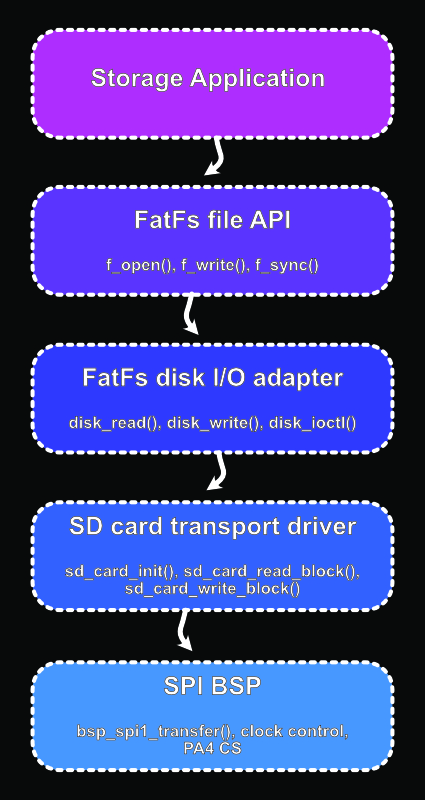
Here I will focus on the Media Access Interface layer.
The SD card driver now provides two basic operations that FatFs needs:
sd_status_t sd_card_read_block(uint32_t block_index,
                                     uint8_t *buffer);
sd_status_t sd_card_write_block(uint32_t block_index,
                                      const uint8_t *buffer);
(Note: I simplified the function names by removing the CMDxx)
FatFs doesn’t know about SD card protocol like CMD17 and CMD24, SPI, or R1 responses, and busy waits. It expects a small platform specific disk I/O layer that can initialise the drive, read sectors, write sectors, and answer a few control queries.
What FatFs needs
FatFs is written to be portable, it doesn’t know how to talk to hardware. The hardware specific part is handled by the provided diskio.c. The key functions are:
DSTATUS disk_status(BYTE pdrv); // Report whether the disk is ready
DSTATUS disk_initialize(BYTE pdrv); // Initialise the physical drive

DRESULT disk_read(BYTE pdrv, BYTE *buff, LBA_t sector, UINT count); // Read one or more sectors
DRESULT disk_write(BYTE pdrv, const BYTE *buff, LBA_t sector, UINT count); // Write one or more sectors
DRESULT disk_ioctl(BYTE pdrv, BYTE cmd, void *buff); // Handle control queries like sector size and sync.
DWORD get_fattime(void); // get the current time
The translation from FatFs looks roughly like this for reads:
FatFs asks: "read sector 1234"
disk_read()
sd_card_read_block(1234, buffer)
CMD17 over SPI
and for writes:
FatFs asks: "write sector 1234"
disk_write()
sd_card_write_block(1234, buffer)
CMD24 over SPI
Adding FatFs to the project
You can download the FatFs library from the official ChaN FatFs site. It comes with the core filesystem code, headers, configuration file, and the Media Access Interface definitions.
I will lay out FatFs like this in my project directories:
ext_libraries/
    fatfs/
        source/
            ff.c
            ff.h
            diskio.h
            ffconf.h
            ffsystem.c
            ffunicode.c
src/
    middleware/
        fatfs/
        diskio.c
ext_libraries/fatfs/will house the main FatFs files downloaded.ffconf.hconfigures FatFs for this project.src/middleware/fatfs/diskio.cIs my implementation of the Media Access Interface and is the file we will be writing in this post, the FatFs source directory contains a template file we can copy over to our src to start from which I will be using.
Lastly remember to add the FatFs path to the includes in your makefile:
CFILES += ext_libraries/fatfs/source/ff.c
CFILES += src/middleware/fatfs/diskio.c

INCLUDES += -Iext_libraries/fatfs/source
Depending on the ffconf.h options, ffsystem.c and ffunicode.c may also be needed later. For this first pass, I am keeping the configuration simple and not including them.
Modifying the diskio.c template
FatFs provides a template Media Access Interface file: diskio.c. Make sure you copy this from the FatFs source directory into the project src/middleware/fatfs directory and edit that one, as that is what will be compiled.
The FatFs template includes example mappings for things like RAM, MMC, and USB drives. For now I do not need that, because I only have one physical drive: the microSD card. So we can simplify the template quite a bit.
The FatFs template starts with these includes:
#include "ff.h"         /* Basic definitions of FatFs */
#include "diskio.h"     /* Declarations FatFs MAI */

/* Example: Declarations of the platform and disk functions in the project */
#include "platform.h"
#include "storage.h"
We keep the first two as they are real FatFs headers we need. We will replace the second two platform and storage with our SD card driver:
#include "drivers/sd_card.h"
Now diskio.c can see the FatFs types and the SD card functions we wrote. The template also contains example drive mappings:
#define DEV_FLASH 0 /* Map FTL to physical drive 0 */
#define DEV_MMC 1 /* Map MMC/SD card to physical drive 1 */
#define DEV_USB 2 /* Map USB MSD to physical drive 2 */
We don’t need these because there is only one drive, we can delete these and replace them with:
#define SD_DRIVE_ID 0u
#define SD_SECTOR_SIZE 512u
The template will use switch (pdrv) blocks to choose between RAM, MMC, and USB examples. For the first implementation, that is unnecessary. If pdrv = 0, we use the SD card, if anything else, it will return an error.
We will also add a status flag in case sd_card_init() fails:
static DSTATUS disk_status_flags = STA_NOINIT;
disk_status()
The template looks like this:
DSTATUS disk_status (
	BYTE pdrv		/* Physical drive number to identify the drive */
)
{
	DSTATUS stat;
	int result;

	switch (pdrv) {
	case DEV_RAM :
		result = RAM_disk_status();

		// translate the result code here

		return stat;

	case DEV_MMC :
		result = MMC_disk_status();

		// translate the result code here

		return stat;

	case DEV_USB :
		result = USB_disk_status();

		// translate the result code here

		return stat;
	}
	return STA_NOINIT;
}
We don’t have RAM_disk_status(), MMC_disk_status(), or USB_disk_status(). For our project we will replace the whole switch with a single drive check:
DSTATUS disk_status(BYTE pdrv) {
        if (pdrv != SD_DRIVE_ID) { return STA_NOINIT; }
        return disk_status_flags;
}
Later we might add card removal detection.
disk_initialize()
The template uses the same pattern for multiple types of drives:
DSTATUS disk_initialize (
	BYTE pdrv				/* Physical drive nmuber to identify the drive */
)
{
	DSTATUS stat;
	int result;

	switch (pdrv) {
	case DEV_RAM :
		result = RAM_disk_initialize();

		// translate the reslut code here

		return stat;

	case DEV_MMC :
		result = MMC_disk_initialize();

		// translate the reslut code here

		return stat;

	case DEV_USB :
		result = USB_disk_initialize();

		// translate the reslut code here

		return stat;
	}
	return STA_NOINIT;
}
Again, we will strip these placeholders out and replace with the sd_card_init(void) function we already developed, we only have to translate the STA_NOINIT flag correctly:
DSTATUS disk_initialize(BYTE pdrv) {
        if (pdrv != SD_DRIVE_ID) { return STA_NOINIT; }

        sd_status_t status = sd_card_init();
        if (status != SD_OK) {
                disk_status_flags = STA_NOINIT;
                return disk_status_flags;
        }

        disk_status_flags = 0;
        return disk_status_flags;
}
disk_read()
The template provides this function:
DRESULT disk_read (
	BYTE pdrv,		/* Physical drive nmuber to identify the drive */
	BYTE *buff,		/* Data buffer to store read data */
	LBA_t sector,	/* Start sector in LBA */
	UINT count		/* Number of sectors to read */
)
{
	DRESULT res;
	int result;

	switch (pdrv) {
	case DEV_RAM :
		// translate the arguments here

		result = RAM_disk_read(buff, sector, count);

		// translate the reslut code here

		return res;

	case DEV_MMC :
		// translate the arguments here

		result = MMC_disk_read(buff, sector, count);

		// translate the reslut code here

		return res;

	case DEV_USB :
		// translate the arguments here

		result = USB_disk_read(buff, sector, count);

		// translate the reslut code here

		return res;
	}

	return RES_PARERR;
}
Again the example functions here aren’t great for our project so we’ll strip them out. FatFs asks for one or more sectors, but our SD card driver reads one 512 byte block at a time. So we will replace the placeholder drive switch with a loop over count. E.g. When FatFs requests sector 1234, count 3, the Media Access Interface (MAI) calls:
sd_card_read_block(1234, &buff[0])
sd_card_read_block(1235, &buff[512])
sd_card_read_block(1236, &buff[1024])
Here is the new read function:
DRESULT disk_read(BYTE pdrv, // Physical drive number
                  BYTE *buff, // Buffer to store data read
                  LBA_t sector, // Start sector in LBA
                  UINT count) { // Number of sectors to read

        if (pdrv != SD_DRIVE_ID) { return RES_PARERR; }
        if (buff == NULL || count == 0u) { return RES_PARERR; }
        if (disk_status_flags & STA_NOINIT) { return RES_NOTRDY; }

        if (sector > (LBA_t)UINT32_MAX ||
            (LBA_t)(count - 1u) > (LBA_t)UINT32_MAX - sector) {
                return RES_PARERR;
        } // Ensure the requested sector range fits the driver's 32 bit block address

        for (UINT i=0; i<count; ++i) {
                sd_status_t status = sd_card_read_block((uint32_t)(sector+i),
                                                        &buff[i * SD_SECTOR_SIZE]);

                if (status != SD_OK) { return RES_ERROR; }
        }

        return RES_OK;
}
This implementation supports FatFs multi-sector reads by breaking them up into individual CMD17 operations, in the future I would like to implement the CMD18 multi-block reads which will be more efficient.
disk_write()
The template provides this:
#if FF_FS_READONLY == 0

DRESULT disk_write (
	BYTE pdrv,	      /* Physical drive nmuber to identify the drive */
	const BYTE *buff,     /* Data to be written */
	LBA_t sector,	      /* Start sector in LBA */
	UINT count	      /* Number of sectors to write */
)
{
	DRESULT res;
	int result;

	switch (pdrv) {
	case DEV_RAM :
		// translate the arguments here

		result = RAM_disk_write(buff, sector, count);

		// translate the reslut code here

		return res;

	case DEV_MMC :
		// translate the arguments here

		result = MMC_disk_write(buff, sector, count);

		// translate the reslut code here

		return res;

	case DEV_USB :
		// translate the arguments here

		result = USB_disk_write(buff, sector, count);

		// translate the reslut code here

		return res;
	}

	return RES_PARERR;
}

#endif
Here we will map the FatFs sector writes onto repeated CMD24 block writes, similarly to the read function:
#if FF_FS_READONLY == 0

DRESULT disk_write(BYTE pdrv,        // Physical drive number
                   const BYTE *buff, // Buffer to write
                   LBA_t sector,     // Start sector in LBA
                   UINT count) {     // Number of sectors to write
        if (pdrv != SD_DRIVE_ID) { return RES_PARERR;}
        if (buff == NULL || count == 0u) { return RES_PARERR; }
        if (disk_status_flags & STA_NOINIT) { return RES_NOTRDY; }
        if (sector > (LBA_t)UINT32_MAX ||
            (LBA_t)(count -1u) > (LBA_t)UINT32_MAX - sector) {
                return RES_PARERR;
        } // Ensure the requested sector range fits the driver's 32 bit block address

        for (UINT i=0; i<count; ++i) {
                sd_status_t status = sd_card_write_block((uint32_t)(sector + i),
                                                         &buff[i * SD_SECTOR_SIZE]
                                                        );
        if (status != SD_OK) { return RES_ERROR; }
        }

        return RES_OK;
}

#endif
Similarly, multi-sector writes are currently split up into repeated CMD24 operations. In the future I could use CMD25 for more efficient multi-block writes, but one step at a time ey.
Now FatFs can use this to write file data, directory entries, FAT tables, FSInfo data, or other metadata. Since the raw block operations were tested previously, failures here are probably due to the Media Access Interface, FatFs config, or API usage, although the lower levels cannot be completely ruled out.
disk_ioctl()
The disk_ioctl function handles miscellaneous control commands from FatFs, the template gives us this:
DRESULT disk_ioctl (
	BYTE pdrv,		/* Physical drive nmuber (0..) */
	BYTE cmd,		/* Control code */
	void *buff		/* Buffer to send/receive control data */
)
{
	DRESULT res;
	int result;

	switch (pdrv) {
	case DEV_RAM :

		// Process of the command for the RAM drive

		return res;

	case DEV_MMC :

		// Process of the command for the MMC/SD card

		return res;

	case DEV_USB :

		// Process of the command the USB drive

		return res;
	}

	return RES_PARERR;
}
Depending on the FatFs config, disk_ioctl() may need to handle the following commands. For this implementation, we will support the common sector information and synchronisation queries:
| Command | Description |
|---|---|
| CTRL_SYNC | Make sure pending writes have completed |
| GET_SECTOR_SIZE | Return sector size in bytes |
| GET_SECTOR_COUNT | Return the number of sectors on the disk |
| GET_BLOCK_SIZE | Return erase block size in sectors |
Which is great because we have covered the core of this in previous posts with our sd_card() driver pulling the CSD register. So we just have to build out these functions a little:
CTRL_SYNC is used by FatFs to make sure that any pending writes have finished. The CMD24 write function already waits until the SD card has finished its internal write cycle before returning so for now if the disk is initialised CTRL_SYNC can return RES_OK:
case CTRL_SYNC:
        return RES_OK;
FatFs also needs to know the logical sector size. Because we are only building this for an SD card we can set this to 512 byte sectors:
#define SD_SECTOR_SIZE 512u

case GET_SECTOR_SIZE:
        if (buff == NULL) { return RES_PARERR; }

        *(WORD *)buff = SD_SECTOR_SIZE;
        return RES_OK;
Get sector count is a bit more interesting because we will need to parse the CSD register for this information. For a SDHC or SDXC card using CSD v2.0, the sector count is calculated from the C_SIZE field. Each increment of C_SIZE represents 512 KiB of capacity, and since the logical sector size is 512 bytes. 512 KiB = 524288 Bytes, so 524288 / 512 = 1024:
sector_count = (C_SIZE + 1) * 1024
So in our sd_card.c driver we can parse the CSD register and store the sector count after initialisation.
C_SIZE is stored in bits [69:48] of the CSD, which is:
 csd[7] - bits [5:0]
 csd[8] - bits [7:0]
 csd[9] - bits [7:0]
#define SD_CSD_STRUCTURE_V1 0u
#define SD_CSD_STRUCTURE_V2 1u

static sd_status_t sd_parse_csd_sector_count(const uint8_t *csd,
                                             uint32_t *sector_count) {
        if ((csd == NULL) || (sector_count == NULL)) {
                return SD_ERR_PARAM;
        }

        uint8_t csd_structure = (uint8_t)(csd[0] >> 6);

        if (csd_structure == SD_CSD_STRUCTURE_V2) {
                // CSD v2.0 used by SDHC and SDXC
                uint32_t c_size = (((uint32_t)csd[7] & 0x3Fu) << 16)
                                 | ((uint32_t)csd[8] << 8 )
                                 | ((uint32_t)csd[9]);
                *sector_count = (c_size + 1u) * 1024u;
                return SD_OK;
        }

        return SD_ERR_UNSUPPORTED_CARD;
}
and
static uint32_t sd_sector_count = 0u;

uint32_t sd_card_get_sector_count(void) {
        return sd_sector_count;
}
Now during the sd_card_init(), after the card has successfully initialised, the driver can read the CSD register and store the sector count:
uint8_t csd[SD_REG_SIZE];

status = sd_read_register(SD_CMD9, csd);
if (status != SD_OK) { return status; }

status = sd_parse_csd_sector_count(csd, &sd_sector_count);
if (status != SD_OK) { return status; }
Now back in disk_ioctl() we can wrap it in GET_SECTOR_COUNT:
case GET_SECTOR_COUNT:
        if (buff == NULL) { return RES_PARERR; }

        *(LBA_t *)buff = (LBA_t)sd_card_get_sector_count();
        return RES_OK;
For GET_BLOCK_SIZE it needs to return the card’s erase block size in units of sectors, not bytes. This is used by FatFs when formatting the card to improve alignment. We are not currently reading the erase block size, so FatFs allows us to return 1, meaning one 512 byte sector:
case GET_BLOCK_SIZE:
        if (buff == NULL) {return RES_PARERR;}

        *(DWORD *)buff = 1u;
        return RES_OK;
This is a valid default and should not affect normal file reads or writes, fingers crossed.
Now we can put all of this together into the disk_ioctl() function:
DRESULT disk_ioctl(BYTE pdrv,     // Physical drive number
                   BYTE cmd,      // Command code
                   void *buff) {  // buffer to send/receive
        if (pdrv != SD_DRIVE_ID) { return RES_PARERR; }
        if (disk_status_flags & STA_NOINIT) { return RES_NOTRDY; }

        switch(cmd) {
        case CTRL_SYNC:
                return RES_OK;

        case GET_SECTOR_SIZE:
                if (buff == NULL) { return RES_PARERR; }

                *(WORD *)buff = SD_SECTOR_SIZE;
                return RES_OK;

        case GET_SECTOR_COUNT:
                if (buff == NULL) { return RES_PARERR; }

                *(LBA_t *)buff = (LBA_t)sd_card_get_sector_count();
                return RES_OK;

        case GET_BLOCK_SIZE:
                if (buff == NULL) { return RES_PARERR; }

                *(DWORD *)buff = 1u;
                return RES_OK;

        default:
                return RES_PARERR;
        }
}
get_fattime()
FatFs can also use a function called get_fattime() to timestamp files. The return value is a packed FAT timestamp:
| Bit Range | Description |
|---|---|
| 31:25 | year from 1980 |
| 24:21 | month |
| 20:16 | day |
| 15:11 | hour |
| 10:5 | minute |
| 4:0 | second / 2 |
I haven’t got a real time clock connected yet so for now we will just return a placeholder timestamp, we will add this to the diskio.c file:
DWORD get_fattime(void) {
        return ((DWORD)(2026u - 1980u) << 25)
                | ((DWORD)6u << 21)
                | ((DWORD)17u << 16)
                | ((DWORD)12u << 11)
                | ((DWORD)0u << 5)
                | ((DWORD)0u);
}
That represents 2026-06-17 12:00:00.
FatFs MAI smoke test
This might have been a bit boring but that is sort of the point, we did all the fun stuff in the bsp_spi.c and sd_card.c and now we are just gluing that functionality into the FatFs Media Access Interface.
We can try a really small FatFs test now… Mounting the filesystem:
In main.c:
#include "ff.h"

FATFS fs;
FRESULT fr;

fr = f_mount(&fs, "0:", 1);
if (fr != FR_OK) {
        bsp_uart1_write_string("f_mount failed\r\n");
        while (1) {}
}

bsp_uart1_write_string("f_mount OK\r\n");
If this works FatFs has successfully called through the MAI, read the boot sector from the SD card and recognised the filesystem.
So we’ve flashed that and pulled up minicom, reset the micro and have seen the very underwhelming “f_mount OK” message so it’s working, but yeah, not the most interesting progress.
In the next post I’ll give more of an overview on the FatFs API, and tackle making files, writing them, and verifying them on a laptop.
Copyright © 2026 David O’Connor